Mastering ASO A/B Testing for Explosive App Growth
Unlock higher installs with our guide to ASO AB testing. Learn data-driven strategies to optimize your app store creative and boost conversions.
ASO A/B testing is a simple concept. You test two versions of an app store asset, like an icon or screenshots, against each other to see which one drives more downloads. The goal is to make decisions based on real user behavior, not just guesswork. By systematically testing your creative assets, you can unlock significant app store growth and boost your conversion rates.
Why Many A/B Tests Fail to Deliver Results
We have all been there. You spend hours, maybe even days, designing a sleek new set of app store screenshots. You launch the A/B test full of hope, and then nothing. A week later, the results are a wash. No clear winner. It's enough to make you wonder if ASO A/B testing is worth the effort.
The hard truth is that many tests are set up to fail. Success is not about running more experiments; it is about running smarter ones. Tweaking a background color from light blue to a slightly darker blue is almost never going to move the needle. People scroll fast. They will not notice such a small change.
You Are Probably Testing the Wrong Things
The number one reason tests fall flat? They focus on tiny, low impact variables. Instead of testing a completely different value proposition or a bold new visual style, teams get bogged down in minor details.
Consider the difference here:
- Weak Test: Changing the font on your screenshot captions from Helvetica to Roboto.
- Strong Test: Testing your current feature focused screenshots against a new set that tells a powerful, benefit driven story.
The second test is much stronger because it taps into a core psychological trigger. It asks a fundamental question: do our users respond better to a logical list of what the app does, or to an emotional connection showing how the app will improve their life? That is a high impact experiment that gives you actionable insights into your audience.
A huge pitfall is treating A/B testing like a checklist of cosmetic tweaks. To actually see growth, you have to shift your mindset from "What color should this be?" to "What message will convince someone to hit install?"
The "Not Enough Data" Problem
The other major roadblock is traffic. Or rather, a lack of it. To get a statistically significant result, you need enough eyeballs on each version of your test. If your app store page only gets a few hundred visitors a day, a test might have to run for weeks or even months to reach a confident conclusion. By then, other market factors could have completely skewed the results.
This is not just a hunch; it is what the data shows. A whopping 61% of A/B tests produce no significant winner, and a staggering 43% of those failures are chalked up to a poor sample size.
But do not let that discourage you. The same data shows that companies running more than ten tests per month grow 2.1 times faster. This proves that a strategic, high volume approach is what separates the winners from the rest. You can dig into more conversion rate optimization statistics to see just how much a persistent testing culture pays off.
Building Your Hypothesis and ASO Test Plan
Every successful ASO test starts long before you touch a single creative asset. It begins with a solid plan, and at the heart of that plan is a clear, testable hypothesis. Without one, you are just guessing. You are throwing different screenshots or icons at the wall and hoping something sticks. That is a recipe for wasted time and inconclusive results.
A strong hypothesis is your North Star. It keeps every experiment focused and purposeful. The most effective framework is dead simple: If we change X, then Y will happen because Z. This forces you to link a specific action to a measurable outcome, all backed by a logical reason.
Crafting a High-Impact Hypothesis
Let's walk through a real world scenario. Imagine you are running a meditation app. You have done your homework and noticed your conversion rate is trailing behind competitors who lean heavily into emotional, benefit driven marketing. That little observation is the perfect starting point for a powerful hypothesis.
- X (The Change): Swap our current, feature focused screenshots (e.g., "50+ Guided Sessions") for new ones that showcase user testimonials and calming imagery.
- Y (The Expected Outcome): We expect to increase our page view to install conversion rate by 10%.
- Z (The Reason): Potential users will form a stronger emotional connection to the feeling our app provides. The social proof from testimonials combined with tranquil visuals will build trust and motivate them to hit "install."
See the difference? This is not just about tweaking a button color. It is a strategic experiment rooted in a psychological premise about what truly motivates your target audience. You are not just testing new visuals; you are testing a completely different messaging strategy.
Defining Your Metrics and Sample Size
Once your hypothesis is locked in, you need to define what victory looks like. Your primary metric, or Key Performance Indicator (KPI), is the one number that will declare a winner. For most ASO tests, this is almost always the conversion rate (CVR) from a product page view to an install.
Next up is making sure your results are actually reliable. This is all about sample size. If you run a test with too few users, you risk falling for a "false positive," where random chance makes a losing variant look like a winner. It happens all the time.
A classic rookie mistake is calling a test early just because one variant jumps ahead after a day or two. User behavior ebbs and flows throughout the week. You absolutely must run tests for at least seven full days to smooth out those daily fluctuations and get clean data.
To make sure your experiments are built on a solid foundation, it is worth brushing up on established A/B testing best practices. They will help you sidestep the common traps. This flowchart breaks down some of the most frequent ways ASO tests go off the rails.
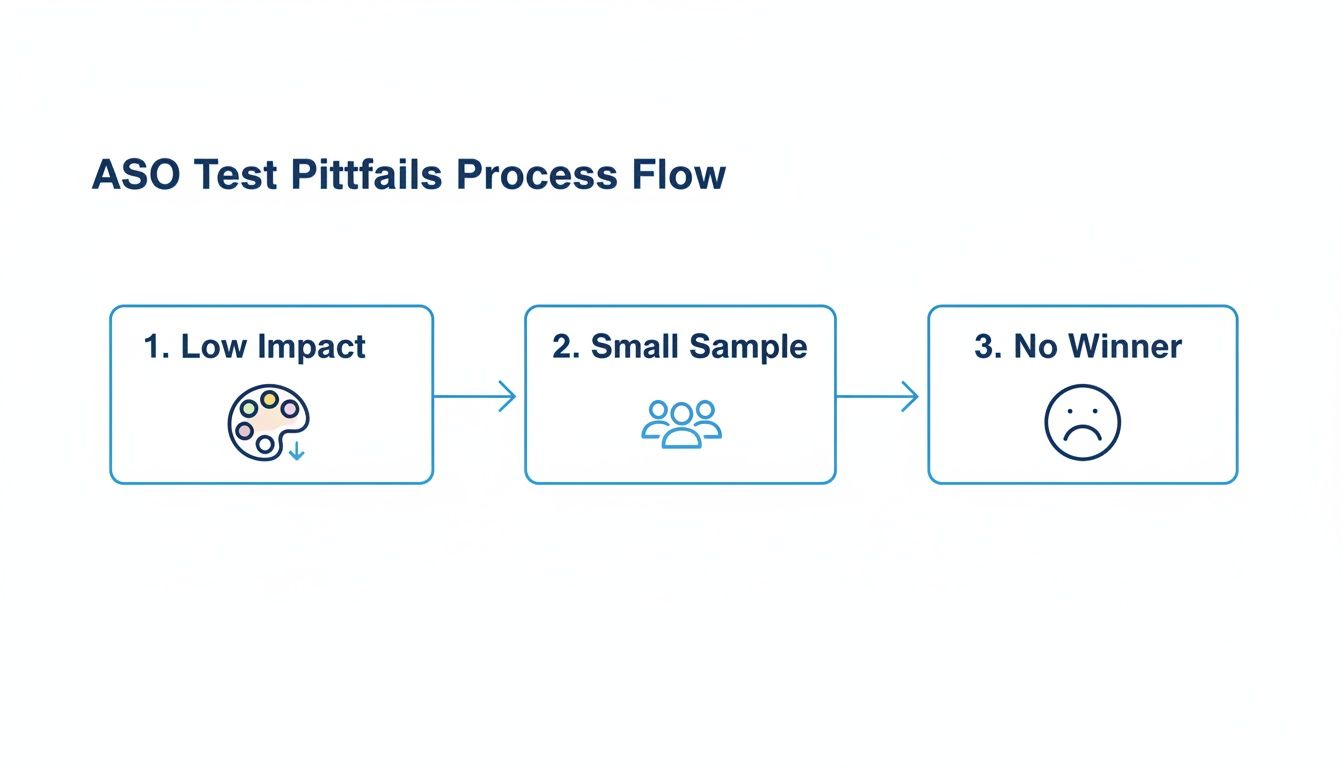
As you can see, testing low impact elements, using a tiny sample size, or cutting a test short are surefire ways to get inconclusive results. A methodical, organized plan is your best defense. A good way to keep everything straight is to explore some of the best app store optimization tools that help manage this process.
ASO A/B Test Planning Framework
To keep everything documented and aligned, I recommend using a simple planning framework for every test. It ensures you have thought through every critical component before you start building variants.
ASO A/B Test Planning Framework Use this framework to structure your ASO A/B tests, ensuring each experiment is well-defined, measurable, and tied to a clear business objective.
| Test Element | Hypothesis | Variable to Change | Primary Metric (KPI) | Required Duration/Sample Size |
|---|---|---|---|---|
| App Icon | If we change the icon from a logo to a character, CVR will increase because it creates a stronger emotional connection. | The primary app icon design. | Conversion Rate (Page View to Install) | 7 days / 10,000 impressions per variant |
| Screenshots | If we replace feature list screenshots with benefit oriented lifestyle images, CVR will increase by 5% because users will better visualize the app's value in their lives. | The first three screenshots in the gallery. | Conversion Rate (Page View to Install) | 14 days / 25,000 impressions per variant |
| Short Description | If we lead with a strong call to action instead of a feature summary, CVR will increase because it creates urgency. | The first 80 characters of the short description. | Conversion Rate (Page View to Install) | 7 days / 15,000 impressions per variant |
| App Title | If we add a keyword like "Photo Editor" to our brand name, impressions will increase because of improved search visibility. | The app's title string. | Impressions (Search) | 28 days (to account for algorithm updates) |
This simple table forces clarity. It makes you state your assumptions, define your metrics, and commit to a timeline, turning vague ideas into a concrete, actionable test plan.
Designing Screenshot Variants That Convert
Think of your app screenshots as your digital billboard. On both the App Store and Google Play, they are often the single most influential factor in someone's decision to download. This makes them the perfect canvas for high impact ASO A/B testing, where you can create efficient and high converting screenshots for both Android and iOS stores.
Forget just swapping out a background color. The real wins come from testing fundamentally different messaging strategies. This is where you can see serious boosts in your app store growth.
A powerful test involves pitting a feature focused approach against a benefit driven story. One set of screenshots might logically list what your app does, while the other tells an emotional story about how your app improves a user's life. This is not just a design tweak; it is a test of your core value proposition.
Creating Your Control and Variant Sets
First, you need a baseline. Your 'Control' is simply your current set of screenshots, the champion you are trying to beat. The 'Variant' is your challenger, built around a specific hypothesis you want to test.
Let's say you have a fitness app. Your test could look something like this:
- Control (Feature Focused): Screenshots with clean, minimalist captions like "Track 100+ Workouts," "Monitor Heart Rate," and "Syncs with Wearables." The design probably uses your standard brand colors and fonts. Straight to the point.
- Variant (Benefit Driven): Now, let's flip the script. Show people achieving their goals, using bold, emotional headlines like "Crush Your Fitness Goals," "Feel Stronger Every Day," and "Your Personal Coach." You could experiment with vibrant, eye catching gradients and appealing imagery with vibrant colors in the background to make the visuals pop.
This kind of test gets right to the heart of what motivates your audience. Do they respond to a logical list of capabilities, or are they drawn to an aspirational vision of their future self? The results can and should inform your entire marketing strategy.
The most effective screenshot tests do not just ask "Which design looks better?" They ask "Which story sells better?" By framing your variants around different user motivations, you gain insights that go far beyond simple aesthetics.
Here is a great example showing how two distinct visual approaches can be set up for an A/B test.
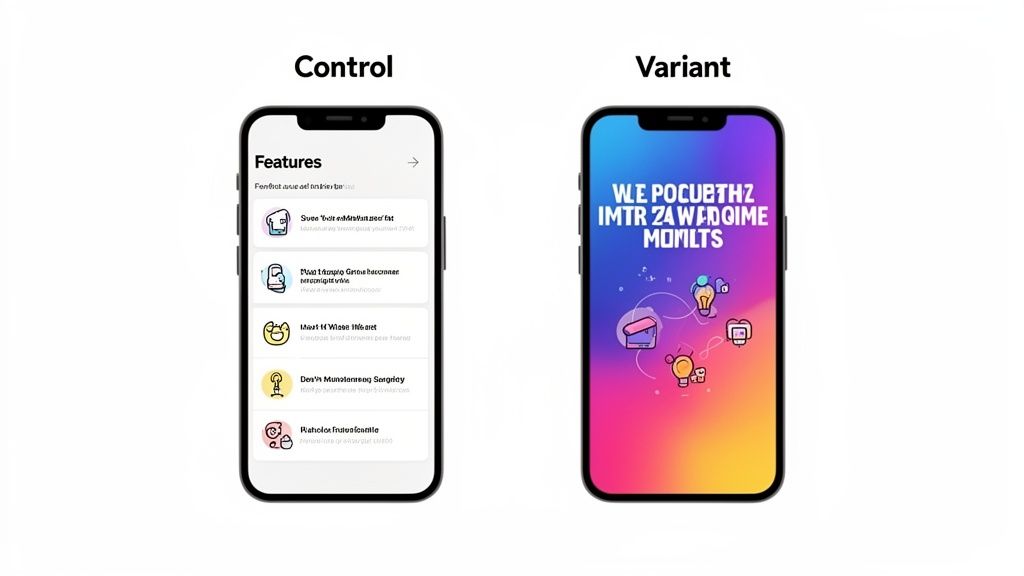
You can see the clear difference here: a feature list 'Control' versus a much more abstract, visually driven 'Variant.' This gives users a clear choice and gives you a measurable outcome.
Leveraging Visual Editors for Rapid Testing
You no longer need a full time designer to run these tests. Modern screenshot editors like ScreenshotWhale make creating high converting variants incredibly fast. You can start with a professionally designed template and quickly build two completely different sets of visuals in minutes.
For a practical example, imagine you want to test your background style. Using an editor, you can create one set with a simple, solid color background. Then, in just a few clicks, you can duplicate that set and apply a vibrant, colorful gradient background to create your variant. This lets you test a high impact visual change without needing complex design skills.
Another powerful test is localization. This goes way beyond just translating text. You can create culturally relevant variants that truly resonate. A food delivery app, for example, might test screenshots featuring sushi for a Japanese audience against those showing tacos for a Mexican audience. Platforms with built in translation engines make this scalable, allowing you to run localized ASO A/B testing across dozens of markets at once.
For a deeper dive, check out our guide on creating compelling iOS app screenshots that are designed to convert from day one.
Your Icon, Title, and Subtitle: The First Handshake
While screenshots get a lot of glory in ASO, it is often your app icon, title, and subtitle that make the first impression. Think about it. In a crowded search results list, these are the tiny billboards fighting for a user's attention before they even tap through to your product page.
That first glance is critical, making these assets a goldmine for A/B testing.
An app’s icon, in particular, can have a massive impact on your tap through rate. Do not be afraid to test fundamentally different concepts to see what really grabs the eye. You would be surprised what works.
- Abstract vs. Literal: For a finance app, you might have a sleek, abstract brand logo. But what if you tested it against a simple, literal icon, like a dollar sign or a rising chart? The literal design might communicate your app's purpose instantly to new users, cutting through the noise.
- Character vs. Object: This is a big one for games. Does a happy, inviting character convert better than a powerful, determined one? Testing this does not just improve conversions; it tells you a ton about what motivates your target audience.
Nailing the Title and Subtitle
Your app’s title and subtitle are doing double duty. They are packed with keywords for ranking but also need to persuade a human to tap. Small tweaks here can have a huge effect on conversion simply by setting the right expectations. The real game is finding that sweet spot between discoverability and a value proposition that just clicks.
For instance, if you were launching a task management app, which of these would you bet on?
- Keyword Focused: "Task Manager Pro Organizer"
- Benefit Oriented: "Effortless Daily Productivity"
The first one is solid for search, no doubt. But the second one speaks directly to a user's pain point. An A/B test is the only way to know which approach actually brings in more qualified installs for your audience. You get to find out what resonates before you commit.
A huge mistake I see teams make is treating their app's title and icon like they are set in stone. They are not just static brand elements; they are dynamic marketing assets. You have to keep testing to stay relevant and maximize your visibility.
How to Test Icons and Titles on Each Platform
Here is where things get tricky. The way you test these elements on Google Play versus the App Store is completely different, and you need to build your strategy around these platform quirks.
On Android, you will use Google Play's Store Listing Experiments. This tool is fantastic for testing organic conversion. You can run tests on your icon, title, and other assets directly on your main store listing. A slice of your organic traffic sees one of your variants, giving you clean data on what appeals most to people browsing the store.
On iOS, things work differently with Apple's Product Page Optimization (PPO). PPO tests run on alternate product pages, not your main one. This is a critical distinction. It means you have to actively drive traffic to these test pages, usually through paid ads or custom links. Because of this, PPO is much better for optimizing your paid user acquisition funnels, not your baseline organic conversion rate.
Analyzing Your Results and Scaling Success
Once your ASO A/B test is live, the real work begins. Hitting "launch" is just the start; the most valuable insights for real app store growth come from digging into the results. This is where you turn raw data into a strategic advantage.
First things first: you need to know if your results are even reliable. Both Google Play and the App Store provide a confidence level, and you should be aiming for 90% or higher. This number is critical. It tells you the odds that your winning variant is a true winner and not just a fluke. Whatever you do, do not get tempted to call a test early just because one version is ahead after a couple of days.
A losing test is not a failure; it is a learning opportunity. If your fancy new benefit driven screenshots underperformed, you just learned that your audience prefers a more straightforward, feature focused approach. That is an incredibly valuable insight for your next test.
Interpreting the Outcome
When the test wraps up, you will be looking at one of three scenarios. Knowing how to react to each one is what makes this whole process pay off.
- A Clear Win: Your new variant blew the old one out of the water. This is the dream scenario. The obvious next step is to roll out the winning design as your new default store listing.
- A Clear Loss: The variant performed worse than what you had before. Do not get discouraged. Instead, figure out why it flopped. Was the new icon too generic? Were the screenshot captions confusing?
- Inconclusive: Neither version showed a statistically significant advantage. This usually happens when the change was too subtle to move the needle, like a tiny font tweak. It is a sign to be bolder with your next hypothesis.
No matter what happens, document everything. Keep a running log of your hypothesis, the variants you tested, the final numbers, and what you think it all means. This little library of knowledge becomes a goldmine for building smarter tests down the road.
Scaling Your Wins Across Your Marketing
A successful test should not stop at just updating your app store page. The real magic happens when you scale those newfound insights across all your marketing channels, creating a ripple effect that lifts your entire acquisition funnel.
Let's say your test revealed that screenshots with vibrant, gradient backgrounds delivered a 15% lift in conversions. That is a massive signal. Your next actionable insight is to apply that same visual style to your paid ad creative on social media and other ad networks. You now have hard data proving this design resonates with your target audience.
This is also where localization becomes a huge growth lever. If a new screenshot layout is a clear winner in your main market, do not just stop there. Using a tool with an integrated AI translation engine, you can instantly spin up localized versions of that winning design for a global audience. This lets you apply your learnings across dozens of languages and regions efficiently, making sure your app's visual message is dialed in for international markets.
By connecting your ASO learnings to your broader marketing efforts, you can improve everything from ad performance to user retention. For a deeper dive, check out some of these proven conversion rate optimization techniques.
Your ASO A/B Testing Questions, Answered
Even with the best laid plans, A/B testing always brings up a few tricky questions. I have seen people get stuck on these same points time and time again. Let's clear up some of the most common ones so you can test with confidence and avoid some painful and costly mistakes.
How Long Should I Actually Run an ASO Test?
The golden rule is to run any test for at least seven full days. No exceptions. This ensures you capture the full weekly cycle of user behavior, because how people browse on a Tuesday morning is completely different from a Saturday night.
But time is not the real finish line here. Statistical significance is.
Both Google Play and the App Store will tell you when you have gathered enough data to make a reliable call, which is usually at a 90% confidence level. Pulling the plug too early is probably the single most common mistake I see. It is tempting, but it means you are making decisions based on random noise, not a genuine shift in user preference. Be patient and let the data mature.
What Is the Real Difference Between Testing on Google vs. Apple?
This is a big one. The two platforms handle testing in fundamentally different ways, and it completely changes your strategy.
Google Play's Store Listing Experiments are built for optimizing your organic traffic. You can test everything, including icons, screenshots, and descriptions, directly on your main store listing. Google shows your variants to a slice of your regular visitors, making it a pure A/B test for conversion rate.
Apple’s Product Page Optimization (PPO), on the other hand, works with alternate product pages, not your main one. This means you have to actively drive traffic to these test pages yourself. Because of this, PPO is much better suited for optimizing your paid user acquisition campaigns, where you can point ad traffic directly to a specific test variant.
Think of it this way: Google is for your window shoppers, Apple is for the traffic you bring in the door yourself.
Should I Test a Bunch of Changes at Once?
Absolutely not. This is a classic trap. When you bundle a new icon, new screenshots, and a new title into a single test, often called a multivariate test, you are left guessing. If conversions go up, was it the icon? The punchier title? You will never know for sure.
Isolate one major variable per test. Pit your new screenshot set against the old one, and that is it. This is the only way to know with certainty that this specific change caused the lift.
This disciplined, one change at a time approach is how you systematically build on your wins. It is how you turn small insights into major, long term growth for your app.
Ready to create high-converting screenshots that drive more installs? ScreenshotWhale offers professionally designed templates and a simple editor to help you build and test stunning app store visuals in minutes. Start designing for free at https://screenshotwhale.com.
Put this into practice on your own listing
Import your live app into an ASO workspace — metadata, keywords, competitors, and store screenshots in one place.
Import my app