Google Play App Store Optimization Made Simple
Master google play app store optimization with proven strategies to boost your app's visibility, increase downloads, and dominate the Play Store.
Launching an app on the Google Play Store can feel like shouting into a hurricane. With millions of other apps out there, just getting noticed is a massive uphill battle. This is precisely where a solid Google Play App Store Optimization (ASO) strategy stops being a "nice to have" and becomes your single most important tool for organic growth.
ASO is not some dark art or a way to game the system. It is about making your app’s store page as clear and compelling as possible for both Google's algorithms and the real people you want to attract. You are essentially doing two things at once: signaling to Google what your app is all about so it can rank you for the right searches, and convincing potential users that your app is the solution they have been looking for.
Why ASO Is Your App’s Most Critical Growth Engine
Sure, paid user acquisition campaigns can get you a quick spike in downloads. But they are expensive, and the traffic dries up the second you turn off the ad spend. ASO, on the other hand, builds a sustainable foundation for long term success. It is a direct line to users who are actively searching for an app just like yours.
Think of it this way: a well optimized store listing is your best salesperson, working 24/7 to boost app store growth and turn visitors into loyal users.
The benefits are impossible to ignore:
- More Visibility: Your app shows up higher in search results for high intent keywords, putting you right in front of people ready to download.
- Better Conversion Rates: Compelling visuals and persuasive copy turn casual browsers into new installs.
- Lower Acquisition Costs: A steady stream of organic traffic means you are less reliant on pricey ad campaigns.
- Global Reach: Smart localization helps your app connect with users in different markets, unlocking entirely new avenues for growth.
The Google Play Store is a brutal marketplace. We are talking about 2.06 million apps, with an average of 1,569 new ones launching every single day. At the same time, Google is cracking down on quality, having removed 1.8 million apps in a single year. That combination of fierce competition and high standards means that ASO has gone from a smart tactic to a fundamental survival strategy.
To succeed, you need a clear framework. ASO is not just one thing; it is a combination of several interconnected efforts.
Core Pillars of Google Play ASO
| ASO Pillar | Primary Goal | Key Metrics |
|---|---|---|
| Keyword & Metadata | Improve search rankings for relevant terms | Keyword Ranks, Search Visibility Score |
| Creative Assets | Boost page to install conversion rate | Conversion Rate (CVR), Impressions to Install |
| Localization (i18n) | Increase downloads from global markets | Installs by Country, Local Keyword Ranks |
| Ratings & Reviews | Build trust and improve conversion | Average Rating, Review Volume & Sentiment |
| A/B Testing | Systematically improve conversion rates | CVR Uplift, Statistical Confidence |
Each pillar supports the others. Great keywords bring in traffic, but compelling visuals are what get people to actually hit "Install."
This guide will cut through the generic advice. We are going to walk through a clear, actionable path to transform your store listing from a static page into a high performance conversion machine. That means digging into how to find the right keywords, create visuals that sell, and understand the data that tells you what is working. It also means looking at the broader app ecosystem, including platforms like the Vibe App Store project, to get a full picture of the competitive landscape. Let's get started.
Finding the Right Words to Get Discovered
Your app's metadata, the title, short description, and long description, is your first handshake with both the Google Play algorithm and your potential users. Think of it as the foundation of your entire google play app store optimization strategy. Get these elements right, and people find you. Get them wrong, and your app might as well be invisible.
The goal is not just to stuff keywords everywhere. It is about figuring out what your ideal users are actually typing into that search bar and then weaving those terms into a story that convinces them to install. Great metadata strikes a delicate balance between discoverability and conversion, making your app easy to find and impossible to resist.
Crafting a High-Impact App Title
Let's be clear: your app title is the single most powerful piece of metadata on your Google Play listing. It carries a ton of weight in the search algorithm. You have got 30 characters to play with, so every single one counts.
The most effective titles I have seen always combine the brand name with the most critical, high intent keyword. For instance, if you have a meditation app called "Serenity," a title like "Serenity: Guided Meditation" instantly tells both Google and users what the app actually does. It is clear, concise, and perfectly optimized.
Here are a few tactical approaches that work well:
- Brand + Primary Keyword: "FitLife: Home Workout Planner"
- Brand - Core Benefit: "QuickScan - PDF Scanner App"
- Keyword-First Approach: "Photo Editor Pro by CreateCo"
The trick is to identify the one term a user would most likely search for to find an app like yours and get it right there in the title. This one change can give you a massive boost in search rankings.
Writing a Compelling Short Description
The short description is your 80 character elevator pitch. It is what users see right below your screenshots, and it is a huge factor for both keyword indexing and getting people to tap "Install." This text needs to be punchy, benefit driven, and packed with your most important keywords.
Ditch the generic fluff. Instead, focus on the immediate value you deliver. For a recipe app, something like "Find thousands of easy & healthy recipes" is miles better than "A great app for cooking."
Your short description has one job: answer the user's unspoken question, "What problem does this app solve for me?" If you can nail that clearly and concisely, you will see a real lift in your conversion rate.
Remember, this description is fully indexed by Google, making it prime real estate for your secondary keywords. It is your chance to expand on your title and pull in even more search traffic.
Mastering the Long Description for Readability
The long description is where you get to tell your app’s full story. With up to 4,000 characters, you have plenty of room to detail features, explain the benefits, and build trust with potential users. And unlike the iOS App Store, the entire long description on Google Play is indexed for keywords.
But here is the thing: nobody is going to read a giant wall of text. The secret to a high converting long description is all in the formatting and structure. Thankfully, Google Play supports basic HTML, which is a total game changer for readability.
Make your description scannable and persuasive with these tools:
- Bold Text (
<b>): Use it to make key features or benefits pop. It draws the user's eye exactly where you want it. - Line Breaks: Create white space between paragraphs. I stick to short paragraphs, just one or two sentences each.
- Emojis & Symbols: Emojis like ✅ or ⭐ are fantastic visual bullet points. They break up the text, add a bit of personality, and, bonus, they can even function as keywords in Google’s search algorithm.
A well structured description often follows a simple formula: start with a strong opening hook, list your key features with benefit focused bullet points, sprinkle in some social proof (like awards or user stats), and finish with a clear call to action. This simple process transforms a boring text block into a powerful sales tool that guides users straight to that "Install" button.
Designing Visuals That Stop the Scroll and Drive Installs
If your app's metadata is the handshake, its visuals are the entire sales pitch. Most people make a split second decision to install or ignore an app based on its icon and screenshots alone. This is where your google play app store optimization can really pay off. Great creative assets lead directly to higher conversion rates.
Visuals are not just decoration; they are your fastest way to communicate. They need to tell a story, show off the core benefits, and build trust in just a few seconds. A sharp, professional look can make your app seem like a category leader, while bad visuals can make even the best app feel amateurish.
Your App Icon: The First Impression
Your app icon is your brand boiled down to its absolute essence. It shows up everywhere: in search results, on the user's home screen, and in Google's "featured" lists. It has to be simple, memorable, and instantly recognizable, even when it is tiny.
Think about the icons for the apps you use every day. They are usually bold, stick to a limited color palette, and avoid getting bogged down with complex details or text. A fitness app might use a simple dumbbell; a music app, a musical note. The goal is instant clarity.
A great icon does not just represent your brand; it has to pop in a crowded search result. Seriously, test your icon design against the top competitors in your category. If everyone else is using blue, maybe a vibrant orange or green is what you need to grab someone's attention.
Crafting a killer icon is a balancing act between branding and simplicity. It has to be unique enough to stick in someone's memory but clear enough that they can guess what your app does. This is the first hook that gets them to click through to your full store listing.
Crafting a Screenshot Gallery That Converts
Once a user lands on your page, your screenshots are front and center. This is your big chance to walk them through your app's best features and prove its value. To create efficient and high converting app store screenshots for the Android and iOS stores, focus on the first two or three. Most people will not even bother scrolling past them.
Good screenshots are so much more than just raw captures of your UI. Treat them like a set of high impact ad banners. Each one needs a clear job to do, combining a visual of the app in action with a short, punchy caption that screams benefits. This is how you build a narrative that takes a user from a problem to your app's solution.
Here is a proven formula for a screenshot story that actually converts:
- The Hook: Your first screenshot has to feature your app's single biggest selling point. What is the number one problem it solves? Lead with that.
- Key Features: Use the next few screenshots to highlight a different major feature in each. Focus on the outcome for the user, not just the function itself.
- Social Proof: Wrap it up with a screenshot that builds trust. This could be a glowing testimonial, a five star rating, or a mention of an award you have won.
Optimizing your screenshots is arguably the most critical thing you can do to boost your conversion rates on Google Play. Since users rarely scroll through every image, the visual punch of those first few directly decides whether they bounce or install. With the global mobile user base projected to hit 7.49 billion by 2025, getting this right is a massive opportunity. You can find more insights about Google Play optimization on App Radar.
Using Tools to Create Professional Visuals Fast
Not too long ago, creating polished, on brand screenshots for every device was a huge pain. It was a time consuming and expensive process that usually required a dedicated designer. Today, tools have made this ridiculously efficient, letting just about anyone produce high quality visuals in minutes.
For instance, with a platform like ScreenshotWhale, you can pick from professionally designed templates, drag your app captures into slick device mockups, and overlay compelling captions. It completely simplifies the workflow for creating vibrant screenshots for different Android devices, like the Samsung Galaxy or Google Pixel.
Here is a quick look at how an editor like this can streamline the whole process, letting you build a high converting screenshot gallery in minutes.
This kind of visual editor makes it dead simple to manage layouts, devices, and captions all in one place. The result is a consistent, professional look across your entire screenshot gallery.
This approach does not just save time; it also helps you stick to google play app store optimization best practices. The templates are often built with conversion in mind, helping you frame your features in the most effective way. You can also quickly generate assets for all the different device sizes, which is crucial for a great user experience on Google Play. Be sure to check out our guide on Google Play Store screenshot sizes to make sure your visuals meet all the technical specs.
At the end of the day, your visual assets are the engine of your store listing's conversion rate. By investing in a memorable icon and a story driven screenshot gallery, you create an irresistible first impression that stops users in their tracks and convinces them to hit that "Install" button.
Expanding Your Reach with Smart Localization and Testing
Taking your app global is a massive growth lever, but it is easy to get it wrong. Just running your store listing through an online translator is not going to cut it. True international success comes from proper localization, the art of adapting your entire presence to connect with users on a cultural level.
This means digging deeper than just words. You need to think about phrasing, color choices, and even the imagery you use.
When you nail localization, you are not just speaking a user's language; you are speaking their dialect. This builds immediate trust and can dramatically lift your conversion rates in new markets. To really dial this in, you will want to get familiar with the principles of geo-targeting optimization, which helps you tailor your approach for specific regions.
Going Beyond Translation to True Cultural Connection
Different cultures respond to visuals and messaging in completely different ways. A color that signifies trust in one country might mean something else entirely in another. A feature that is a primary selling point in the United States could be less relevant to users in Japan or Brazil.
Effective localization means adapting your:
- Screenshots and Graphics: Tailor the imagery to reflect local culture, landmarks, or even the most popular devices in that region.
- Copy and Tone: Adjust phrasing so it sounds natural and persuasive, not like a stiff, literal translation. We have written more about the nuances between regional language styles in our guide on how to localise or localize your app.
- Currency and Formats: Make sure all numbers, dates, and currencies are displayed in the local format. It is a small detail that avoids confusion and builds credibility.
Manually creating localized screenshots for dozens of languages used to be a monumental task. I have been there, and it is a grind.
Fortunately, modern tools can automate almost this entire process. For instance, ScreenshotWhale’s AI translation engine can take your primary set of screenshots and generate localized versions for over 100 languages in just a few minutes, making global launches incredibly efficient.
The flow below breaks down the core visual elements you need to get right for every single market.
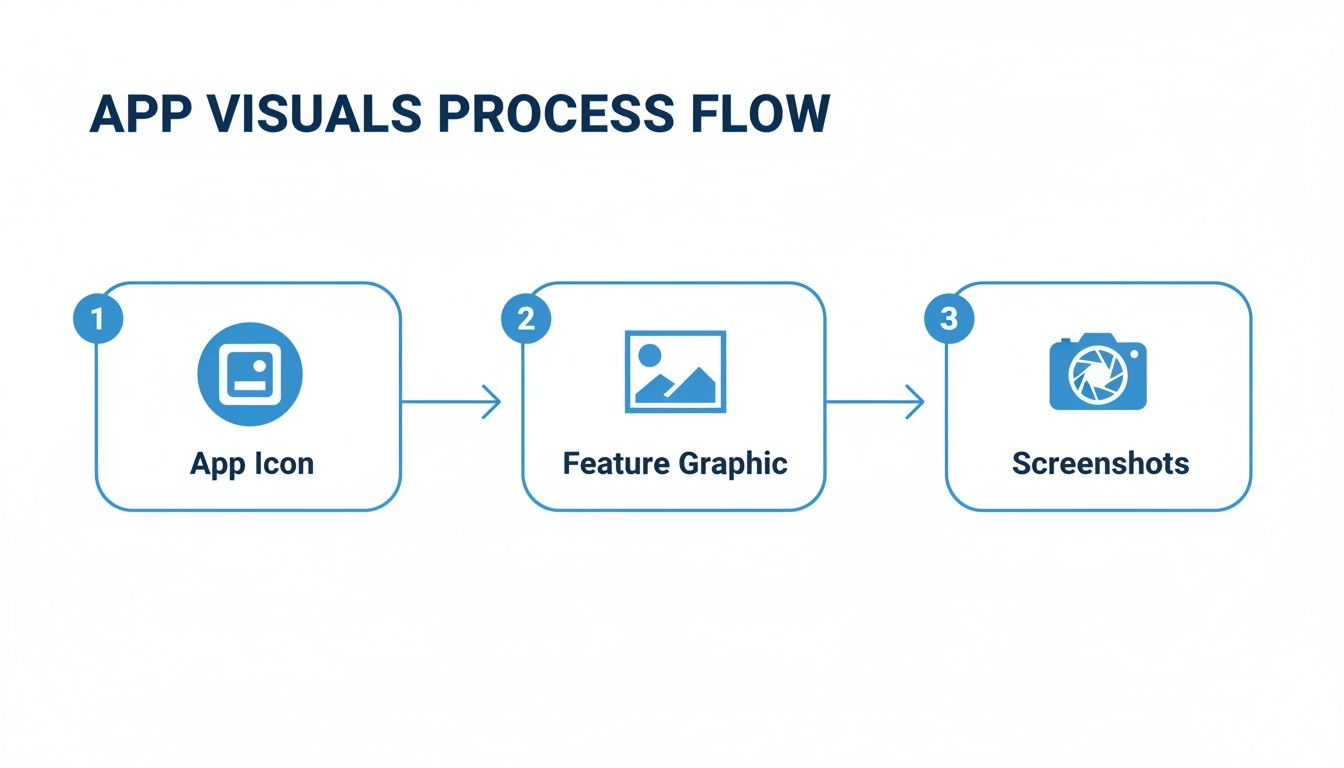
As you can see, a user's journey starts with the icon, is captured by the feature graphic, and is ultimately sold by the screenshots. Each one of these steps is an opportunity to connect, or disconnect, with a local audience.
Unlocking Growth with Store Listing Experiments
So, how do you actually know if your new icon, screenshots, or description will improve conversions? You do not guess. You test.
Google Play’s built in Store Listing Experiments is your best friend here. It is a powerful A/B testing tool that lets you make data driven decisions instead of relying on gut feelings.
This feature lets you test different versions of your creative assets and copy against each other to see which one actually performs best. You can run experiments on nearly every part of your listing, from the icon and feature graphic to your screenshots and video. By making small, iterative changes, you can systematically increase your install rate over time.
A/B testing removes ego and opinions from the optimization process. The data tells you what works, giving you the confidence to roll out changes that have a proven, positive impact on your app's growth.
A good experiment always starts with a clear hypothesis. For example: “Using screenshots that feature human faces will create a stronger emotional connection and increase conversions by 5% compared to our current UI focused screenshots.”
You then set up the experiment in the Google Play Console, running the new "human centric" version against your current one (the "control"). Google will show each variant to a segment of your store visitors and report back on which one drove more installs.
Once you have a statistically significant winner, you can confidently apply that change to 100% of your audience. This continuous loop of testing and refining is the secret to sustained ASO success.
Here are a few ideas to get you started with your own experiments.
A/B Testing Ideas for Your Store Listing
| Element to Test | Variation A (Control) | Variation B (Hypothesis) | Potential Impact |
|---|---|---|---|
| App Icon | Current design with gradient background | Simplified, flat design with a single bold color | Improve visibility and brand recall |
| Feature Graphic | Static image of the app's main screen | Short video highlighting the top 3 features in action | Increase engagement and feature discovery |
| Screenshots | UI focused, showing core functionality | Lifestyle images with people using the app in context | Create an emotional connection, boost installs |
| Short Description | "Manage tasks, projects, and goals efficiently." | "Join 1M+ users who get more done. Try it free!" | Add social proof and a clear call to action |
| Promo Video | 30 second animated explainer | 15 second user generated content montage | Feel more authentic and relatable to new users |
Running these kinds of tests consistently is what separates the top charting apps from the rest. Start with one simple test, learn from the results, and then build from there.
Getting your metadata right and your visuals looking sharp will absolutely drive people to your store listing, but that is only half the battle. Just getting them there does not lock in a high rank. Google's algorithm is a lot smarter than that; it does not just push popular apps, it promotes high quality apps that work flawlessly and that people genuinely love using.
This is where user satisfaction and technical performance become your secret weapons for google play app store optimization.
Think of your ratings, reviews, and your app's stability as a powerful feedback loop. A great user experience leads to better ratings, which builds trust and convinces more people to install. At the same time, an app that does not crash or lag keeps users happy and signals to Google that you are offering a reliable experience, one that is worthy of a top spot in the search results.
Turn User Feedback into a Ranking Signal
That star rating is one of the first things anyone sees. It is a gut check indicator of quality and a massive factor in whether someone even bothers to read your description. While a high rating is fantastic social proof, its real power is the direct signal it sends to the Google Play algorithm.
Google's goal is simple: recommend apps that its users will actually enjoy. High ratings and positive reviews are the clearest possible sign that your app delivers on its promises.
Here is how you can actively encourage that positive feedback:
- Prompt at the perfect moment. Do not be that app that asks for a review the second someone opens it. Wait for a win. Trigger the prompt after a user completes a level, crushes a workout, or successfully saves a project. Catch them when they are feeling good about your app.
- Make it ridiculously easy. Use the official in app review API. This lets users drop a rating and review without ever having to leave your app. Reducing that friction is huge and dramatically increases the chances they will follow through.
- Reply to all of your reviews. Seriously. Thanking happy users makes them feel heard and builds a loyal community. But just as important is publicly addressing negative reviews. It shows you are listening, you care, and you are committed to making things better.
That last point can not be overstated. A thoughtful, helpful response to a bad review can sometimes turn a frustrated user into an advocate. And for everyone else scrolling by, it is a powerful demonstration of great customer service.
Keep an Eye on Your Android Vitals
Beyond what users are saying, Google is looking hard at how your app is actually performing. The Android Vitals dashboard in your Google Play Console is ground zero for this. It tracks the metrics that directly impact user experience and, by extension, your ASO.
Google looks at several core vitals, but these are the ones you need to watch like a hawk:
- Crash Rate: The percentage of daily user sessions that end abruptly in a crash.
- ANR Rate: "Application Not Responding" errors. These happen when your app’s UI freezes up because it is blocked for too long.
- Slow Rendering: Any issues causing your app's interface to stutter, lag, or feel janky.
Google has every reason to feature stable, performant apps. If your app is buggy and crashes all the time, the algorithm simply will not recommend it, no matter how perfect your keywords and screenshots are.
Fixing these problems is not just about good housekeeping; it is a direct investment in your app's visibility. Make a habit of checking your Android Vitals dashboard, digging into the root causes of crashes and ANRs, and making bug fixes a priority. Publishing your app is just the starting line; maintaining its health is how you win the race. For a refresher on that first step, check out our guide on how to publish an app on Google Play.
User engagement and technical health are increasingly dominant ranking factors. Think about it: very few apps manage to sustain a 4.0+ star rating, so delivering an excellent user experience is a massive differentiator. Google’s algorithm looks at everything from download numbers to user retention and Android Vitals, creating a direct line from your app's stability to its search rank. It is no coincidence that most top tier apps are updated at least monthly. This kind of constant improvement is what it takes to succeed. To dig deeper, you can explore more about Google Play ranking factors on MobileAction.
Got ASO Questions? We've Got Answers
Diving into the world of Google Play app store optimization always kicks up a few questions. As you get deeper into your strategy, you will inevitably run into new challenges and things that make you go "hmm." Here are some quick, no fluff answers to the questions I hear most often from developers and marketers.
How Long Does This ASO Thing Actually Take to Work?
Everyone wants that instant gratification, but ASO is a classic long game, a marathon, not a sprint. Sure, you might see a little bump in keyword rankings within a week after a big change, like updating your app title. But that is just the opening act.
Think of it like pushing a boulder. It is slow at first. You will probably start to see some initial, meaningful movement in your impressions and store listing visitors within 3 to 6 weeks. The real, sustainable growth, the kind that moves the needle on installs and solidifies your rankings, comes from months of consistent effort, testing, and tweaking. Patience is your best friend here. Trust the process and let the data be your guide.
What's More Important: Keywords or My Conversion Rate?
This is the classic chicken and egg ASO dilemma, but there is a pretty logical way to approach it. You have to start with keywords. It is simple, really: if people can not find your app, you have zero traffic to convert. Your first job is to get on the map and start getting eyeballs on your store listing.
Once you see a steady stream of impressions coming in, that is your cue to pivot and obsess over your conversion rate optimization (CRO). This is where your killer visuals and persuasive copy come into play, turning those looky loos into actual users.
A high conversion rate does more than just get you installs; it is a massive quality signal to Google's algorithm. Improving it can actually give your keyword rankings a serious boost, creating a powerful feedback loop. The best ASO pros work in a cycle: optimize keywords, improve conversions with A/B tests, see what worked, and then use those insights to go back and refine the keywords all over again.
How Often Should I Be Updating My Store Listing?
Your Google Play listing should be a living, breathing part of your marketing, not a "set it and forget it" task you check off a list once. How often you update really depends on what you are changing.
Here is a good rhythm to follow:
- Metadata (Title, Descriptions): Get in the habit of reviewing and refreshing your keyword strategy at least once a quarter. This keeps you from falling behind competitor moves and lets you adapt to how people are searching right now.
- Visuals (Screenshots, Video): Any time you push a major feature release, your screenshots and feature graphic should be updated to match. Your store listing needs to sell the version of the app people can download today, not the one from six months ago.
- Seasonal & Event Based Tweaks: This is a pro move. Smart marketers create custom visuals for holidays (think Christmas or Halloween) or big industry events. It is a fantastic way to catch waves of user interest and give your conversion rate a nice, timely bump.
Regular updates do two things: they signal to Google that your app is actively maintained (which is a good thing for visibility), and they show users you are constantly making things better. That builds trust, and trust drives downloads.
Ready to create stunning, high converting visuals that actually stop the scroll? With ScreenshotWhale, you can design professional App Store and Google Play screenshots in minutes using beautiful templates and a dead simple editor. Start creating for free at https://screenshotwhale.com.
Put this into practice on your own listing
Import your live app into an ASO workspace — metadata, keywords, competitors, and store screenshots in one place.
Import my app