
what is user experience design: A Quick, Compelling Guide
Discover what is user experience design and why it shapes apps and products. Learn core UX principles to boost usability and conversions.
User experience design is all about crafting products, systems, or services that just work for people, making them easy, efficient, and genuinely meaningful to use. It’s a human-first approach that aims to make technology feel effortless by getting to the heart of what users actually need and want.
So, What Is User Experience Design Really?
Think of user experience (UX) design as the invisible hand guiding you through a mobile app or a website. It’s the art and science of making sure every single step of a user's journey feels logical, intuitive, and satisfying. Great UX is not just about pretty visuals; it is about having deep empathy for the person on the other side of the screen.
When an app feels completely natural to navigate, that’s good UX. When you can buy something online without a single moment of frustration, that’s also the result of thoughtful UX design. The whole point is to eliminate friction and make technology serve people, not the other way around.
The Four Pillars of User Experience
At its core, UX is built on a few foundational ideas. These are not just buzzwords; they are the principles that separate a frustrating product from one that people love. We can break them down into four key pillars.
| Pillar | What It Means for the User |
|---|---|
| Usable | "I can figure this out quickly and accomplish my goal without getting stuck or confused." |
| Equitable | "This product works for me, regardless of my background, abilities, or how I use technology." |
| Enjoyable | "Using this feels good. It is not just functional; it is a pleasant, positive experience." |
| Useful | "This actually solves a real problem for me. It adds value to my life and meets a need." |
Getting these four pillars right is what makes an experience feel seamless. A product might be useful, but if it’s not usable, people will simply give up.
Essentially, UX designers are advocates for the end-user, constantly asking how to make things better from their perspective. To get a fuller picture of how this fits with visual design, it's worth exploring what is UX/UI design.
How Good UX Fuels App Growth
In the hyper-competitive world of mobile apps, exceptional UX is a massive advantage. It is not a "nice-to-have", it directly drives growth and conversions by creating a product people genuinely enjoy and want to recommend.
For example, an intuitive onboarding process, designed with solid UX principles, can dramatically reduce how many users give up and delete the app after the first launch. It makes a powerful first impression.
A well-designed user experience ensures that your app is not just functional but also a delight to use, which is critical for retaining users and earning positive reviews on the iOS and Android stores.
Ultimately, understanding user experience design means recognizing its direct line to user satisfaction and, by extension, business success. It’s about building efficient, high-converting experiences right from the very first tap.
The Hidden History of Human Centered Design
We tend to think of user experience design as a modern field, something that grew out of smartphones and websites. But its core ideas are as old as human ingenuity itself. The practice of putting people first is timeless, born from the simple goal of making our tools and our world work better for us.
This human-centered approach did not start with the first computer; it started with the first person who chiseled a rock to fit their grip just right.
This drive to optimize our surroundings has deep roots. In fact, you can find traces of user experience thinking as far back as 4000 BC in the Chinese practice of Feng Shui. It was all about arranging spaces to create harmony and an ideal "flow" for the people living in them, a clear forerunner to modern UX principles that focus on intuitive navigation and user comfort. You can discover more about the evolution of user experience and see how these early philosophies laid the groundwork for today's design.
This thread of human-centered design runs straight through history, long before we had digital interfaces. Just think about the thoughtful ergonomics of a well-balanced sword or the intuitive layout of a medieval village. Each was designed with the end user's needs, limitations, and goals in mind, whether that user was a soldier in combat or a merchant trying to find their way through a bustling market.
The Industrial Revolution and Early UX
The formal study of user-focused efficiency really picked up steam during the industrial age. Pioneers like Frederick Winslow Taylor were not just trying to boost factory output; they were analyzing workflows to reduce the physical toll on workers. His time-and-motion studies were essentially an early form of usability testing, all aimed at finding the most efficient and least draining way for a person to do their job.
Around the same time, industrial designer Henry Dreyfuss was championing the idea of building products that fit the human form. He operated with a deep sense of empathy for the user.
"When the point of contact between the product and the people becomes a point of friction, then the industrial designer has failed. On the other hand, if people are made safer, more comfortable, more eager to purchase, more efficient, or just plain happier, by contact with the product, then the designer has succeeded."
That philosophy laid some serious groundwork for what we now call user experience design.
From Mainframes to Mobile Screens
The personal computer boom in the 1980s changed everything. As technology spilled out of laboratories and into millions of homes, the need for intuitive interfaces became critical. Designers could not just assume their users were highly trained experts anymore. This shift forced the entire tech industry to get serious about making complex systems understandable for the average person.
You can see this evolution playing out right now in the world of mobile apps. For developers and marketers, this long history drives home a crucial lesson for achieving app store growth and high conversions.
To create high-converting app store screenshots for Android and iOS, you have to tell a clear visual story. Each screenshot needs to function like a mini-tutorial, showing the app's value with vibrant images and punchy, minimal text. This is just a modern take on a very old idea: guide the user effortlessly toward their goal. Just as Feng Shui optimized the flow of a room, your screenshots must optimize the user's path to hitting that "Download" button.
Decoding the Principles of Great UX
What separates an app that people love from one they just tolerate? It’s not a secret formula, but a set of core principles that guide every great user experience. These are not just abstract theories you learn in a design class; they are the practical foundations that turn a functional app into an unforgettable one, directly fueling app store growth and conversions.
Think of these as the laws of physics for digital products. Just like gravity dictates how an apple falls, these rules govern how people actually interact with your app. Ignore them, and you get confusion and frustration. Embrace them, and you create the kind of seamless experience that keeps users coming back.
Making It Usable
First up, and completely non-negotiable, is usability. If people cannot figure out how to use your app, absolutely nothing else matters. Usability is all about making things clear, efficient, and intuitive, so users can get what they need done with the least amount of friction.
Imagine you are on a hiking trail. Good usability is like having clear, easy-to-read signs at every fork, pointing you straight to that scenic overlook. Bad usability is a trail with no signs at all, leaving you lost, annoyed, and ready to head back to the car. Your app should feel like the well-marked trail.
This same logic applies to your app store page. When you’re creating app store screenshots, your goal is to make your app's value instantly usable. For a practical example, a site editor for screenshots allows you to quickly add bold captions like "Plan Your Week in Seconds" on a calendar view. This makes the core benefit immediately clear, a critical driver for conversions.
Ensuring It Is Accessible
Next on the list is accessibility, which is the practice of designing products that can be used by everyone, regardless of their abilities. This is not just a niche concern or a box to tick; it’s a cornerstone of inclusive design that, time and again, ends up improving the product for all users.
The perfect real-world example is a curb cut on a sidewalk. It was originally designed to help people using wheelchairs, but it also helps parents with strollers, travelers with rolling luggage, and delivery workers with carts. What began as a solution for one group made the environment better for everyone.
In the digital world, accessibility means things like:
- High-Contrast Text: Making sure text is actually readable against its background.
- Alternative Text for Images: Writing descriptions for screen readers so visually impaired users get the full picture.
- Keyboard Navigation: Ensuring every single feature can be used without a mouse.
Building an accessible product is not just the right thing to do; it expands your potential user base and is a true mark of quality design. If you want to dive deeper into putting these ideas into practice, checking out these user experience design best practices is a great place to start.
Creating Something Desirable
Finally, great UX moves beyond just being functional and aims to be desirable. This is the emotional side of design, that feeling of delight or satisfaction a user gets when they interact with your product. Desirability is what turns a one-time visitor into a loyal fan.
Think about the difference between a cheap, disposable pen and a well-crafted fountain pen. Both get the job done, but one provides an experience that’s just plain satisfying. That’s desirability. In an app, this comes through in smooth animations, a pleasing color scheme, or a witty tone of voice that connects with the user.
Desirability is the crucial link between function and emotion. It’s what makes users want to come back, not just because they have to, but because they genuinely enjoy the experience.
This principle ties directly into the visual appeal of your app store screenshots. Using vibrant, attractive images is not just about grabbing attention; it’s about telegraphing a desirable experience. For instance, using a screenshot editor, you can apply a consistent, colorful background across all your images to create a professional and appealing look. Your screenshots for both the Android and iOS app stores should spark a positive feeling, showing users not just what your app does, but how good it will feel to use it.
The visual and functional elements have to work together, much like user interface and user experience design are two sides of the same coin. If you're keen on the visual side of things, learning about user interface design fundamentals is a solid next step. By mastering usability, accessibility, and desirability, you build an app that does not just work, it wins people over and drives real, sustainable growth.
How a Great User Experience Is Built
A fantastic user experience does not just materialize out of thin air. It’s carefully constructed through a process that’s both structured and deeply human. Think of it less like a rigid formula and more like a flexible framework for solving real problems for real people. This journey is all about taking a rough idea and shaping it into a polished, intuitive product that just feels right.
The whole process is iterative. What does that mean? Designers are constantly cycling through phases: learning, building, and testing. This loop prevents teams from sinking months into building something nobody wants or can figure out how to use. It’s a deliberate effort to put the user at the absolute center of every single decision.
Understanding the User Through Research
Everything kicks off with empathy. Before a single pixel is placed, UX pros dive deep into user research to genuinely understand the people they’re designing for. The goal is to move past assumptions and uncover the actual needs, behaviors, and pain points of the target audience.
This is not just about asking people what they want. It involves a whole toolkit of methods to gather meaningful insights:
- User Interviews: One-on-one conversations are gold. You get to hear about users' experiences in their own words.
- Surveys: These help collect quantitative data from a larger group, making it easier to spot broad trends and patterns.
- Observation: Sometimes the best insights come from simply watching people use existing products to see where they struggle, often without even realizing it.
From all this research, designers create tools like user personas, fictional characters that represent a key user type. They also map out journey maps, which visualize the step-by-step experience a person goes through to get something done. These tools keep the design team grounded, ensuring they never lose sight of who they’re building for.
This infographic shows how the foundational principles of usability, accessibility, and desirability come together to create a great user experience.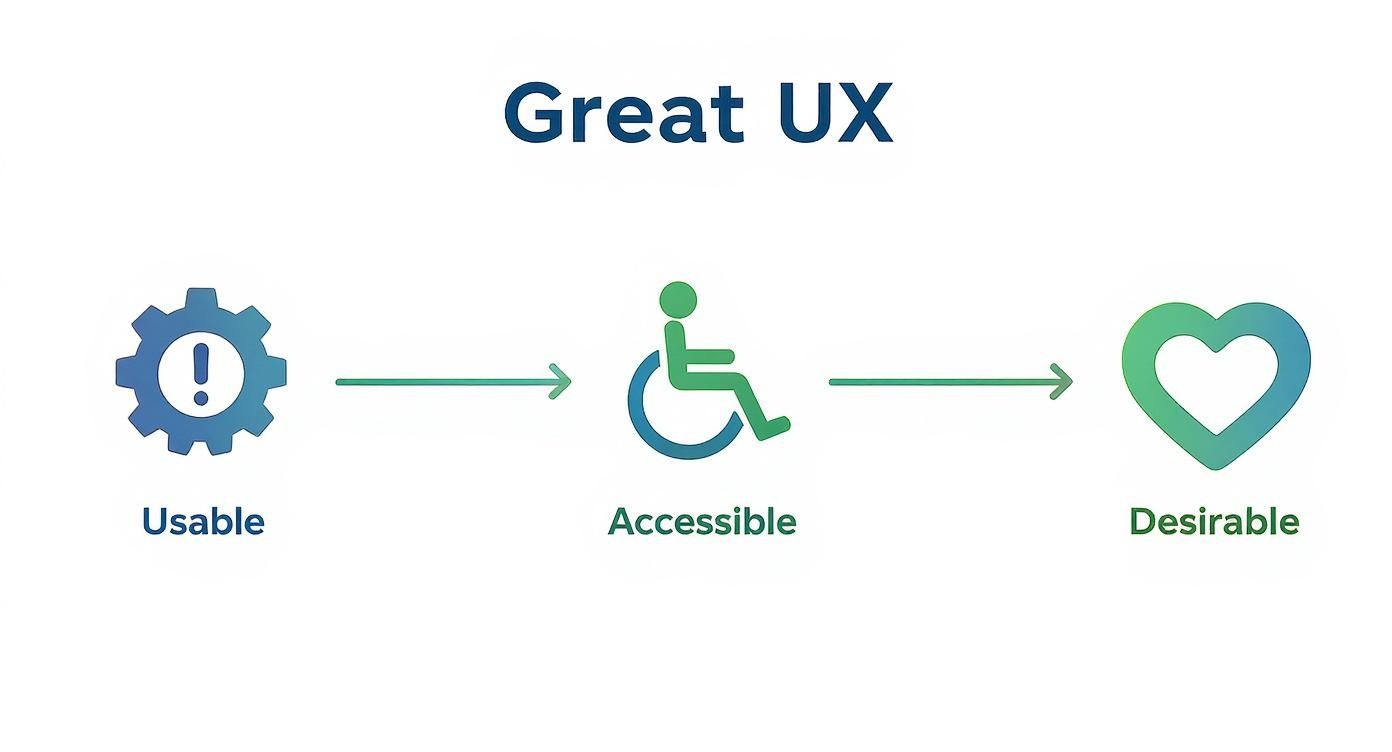
The visual nails it: a product has to be functional and easy to use first, then inclusive for everyone, and finally, it has to connect on an emotional level.
Generating Ideas with Wireframes
Once the team has a solid grasp of the user's problem, the ideation phase begins. This is where creativity takes over. Designers brainstorm a wide range of potential solutions, focusing on quantity over quality at first. It’s all about encouraging broad thinking before zeroing in on the most promising concepts.
A key output here is the wireframe. Think of a wireframe as a simple blueprint for a screen in an app or on a website. It uses basic shapes and lines to map out the structure and layout, focusing purely on function and where information goes, no color, branding, or pretty visuals just yet.
Wireframing lets designers quickly play with different layouts and user flows without getting bogged down in visual details. It is a low-cost way to answer the big structural questions before anyone gets too attached to a specific design.
This skeletal structure ensures everyone, designers, developers, product managers, is on the same page about the core functionality before any visual design work kicks off. You have to get the foundation right first.
Prototyping and Testing for Refinement
With a solid wireframe in place, the next step is building a prototype. A prototype is an interactive, clickable model of the product that simulates the real user experience. These can range from simple, low-fidelity models sketched on paper to high-fidelity versions that look and feel almost exactly like the finished app.
This is where the design really comes to life. A high-fidelity prototype, for example, can be used to show a stakeholder exactly how a new feature works or to nail down the visual appeal of an app. Anyone creating an iPhone app mockup for their store page is essentially showing off a static version of this thinking, trying to convey the app's look and feel in a single glance.
But the most critical part of this phase is usability testing. Here, the prototype is put in front of actual users who are asked to perform specific tasks. Designers watch their behavior, listen to their feedback, and pinpoint any moments of confusion or friction. The insights from these tests are priceless; they reveal what’s working and what needs a rethink.
This cycle of building, testing, and refining continues until the product is intuitive, efficient, and truly ready for launch.
Using UX to Win on the App Store
All the theory and process behind user experience design comes down to a single moment of truth: your app store page. This is where UX meets the real world, and it directly translates into downloads and growth. Your store listing is often the very first impression you make on a potential user, so getting it right is not just a good idea, it is everything.
Think of your app store page as the front porch of your digital home. If it’s messy, confusing, or just plain uninviting, people will turn around and leave. A great experience here sets the stage for a great experience inside the app itself.
Crafting a Compelling Visual Story
Your app screenshots are your most powerful storytelling tool. Period. They are not just a random collection of UI images; they are a visual pitch designed to show off your app's core value in a matter of seconds. The goal is to stop showing features and start demonstrating benefits.
To pull this off, you need to think in terms of a clear, high-converting sequence. Each screenshot should build on the last, guiding the user through a quick story of how your app solves their problem or makes their life better. Use vibrant, eye-catching imagery and pair it with short, benefit-driven text overlays.
The launch of the iPhone back in 2007 was a massive turning point for user experience design, forcing everyone to rethink what an intuitive mobile interface could be. It introduced the world to touch-first design and personalized experiences, which directly shaped the mobile-first strategies we see today. That moment proved that a powerful user experience drives consumer demand, a lesson that is absolutely critical for app store success.
Designing High-Converting Screenshots
Creating efficient and high-converting app store screenshots for the Android and iOS stores is all about applying UX principles directly to your visuals. That means focusing on clarity, immediate impact, and a subtle call to action that gets people curious to learn more.
Here are a few actionable insights for designing screenshots that boost conversions:
- Lead with Your "Aha!" Moment: Your first 1-2 screenshots are the most important. They must instantly communicate your app's main value proposition.
- Use Bold, Legible Text: Keep text overlays short and punchy. A site editor can help you test different font sizes and colors against your background for maximum readability on a small screen.
- Showcase with Vibrant Colors: Use a neat, appealing color palette that aligns with your brand. Bright, vibrant colors can grab attention and convey a positive user experience.
- Create a Narrative Flow: Arrange your screenshots to tell a story. For example, screen one shows the problem, screen two shows your app's solution, and screen three shows the reward.
- Maintain Brand Consistency: Stick to your brand's colors and fonts. This creates a professional and trustworthy look that feels like a natural extension of your app.
This example from Apple's developer guidelines shows how to use a panoramic, continuous background to tell a single, cohesive story across multiple images.
The key takeaway here is the seamless flow. It encourages users to keep swiping, absorbing your full value proposition one screen at a time.
For a comprehensive look at optimizing every part of your store listing, check out our guide on App Store Optimization best practices. It will help you sync your screenshots with your icon, title, and description for maximum impact.
In a crowded marketplace, your screenshots are your 5-second pitch. Make them count by telling a story of value, not just a tour of features. This shift in perspective is what separates a good app store page from a great one.
Ultimately, whether you are designing for iOS or Android, your approach should be rooted in understanding the core of user experience design: a discipline built on empathy and clarity. By applying these principles to your store presence, you create an effective, high-converting gateway that turns casual browsers into loyal users.
iOS vs Android App Screenshot Best Practices
While the core principles of telling a visual story remain the same, the Apple App Store and Google Play Store have their own nuances. Understanding these differences is key to optimizing your screenshots for each platform and maximizing your downloads. This table breaks down the specific best practices to keep in mind for both ecosystems.
| Design Element | iOS App Store Tip | Google Play Store Tip |
|---|---|---|
| First Impression | The first 3 portrait screenshots (or 1 landscape) are visible in search results. Make them your strongest pitch. | Often only the feature graphic is prominent in search. Screenshots are key once a user lands on your page. |
| Text Overlays | Keep text minimal and benefit-focused. Apple's review team prefers a clean, unobtrusive look. | You have more flexibility. Taller screenshots allow for more creative text placement and storytelling elements. |
| Device Frames | Using device frames is common and helps contextualize the app, giving it a polished feel. | Less common. The focus is more on the UI itself, but frames can still be used for a professional touch. |
| Video Previews | App Previews auto-play on mute. They must be visually compelling without sound from the very first frame. | Promo videos are linked from the feature graphic and require a user to tap play. They feel more like a YouTube ad. |
| Backgrounds | Panoramic or blended backgrounds that connect screenshots are highly effective and encourage swiping. | While possible, the focus is often on individual, high-impact visuals that stand on their own. |
| Call to Action | Subtly guide users through a narrative. The CTA is implicit: "This is what you can do." | You can be more direct with CTAs in your text overlays, like "Track Your Progress" or "Design in Minutes." |
Tailoring your visual assets to each platform's guidelines and user expectations shows attention to detail and can significantly improve your conversion rates. It signals to users that you have built a native, high-quality experience just for them.
Common Questions About UX Design Answered
Once you start digging into user experience design, a few questions always seem to surface. It makes sense, the field is a mashup of art, science, and psychology, so it’s natural to hit a few confusing spots.
Let's clear the air and tackle the big ones. Think of this as your go-to guide for sorting out the essential distinctions and career realities of the UX world.
What Is the Difference Between UX and UI Design?
This is, without a doubt, the most common question out there, and the distinction is critical.
Let’s use a house analogy. User Experience (UX) design is the architectural blueprint. It’s the logic behind the layout, how many rooms you have, where the doors and windows go for the best flow, and whether the kitchen is easy to get to. It’s all about structure and making sure the house actually works for the people living in it.
User Interface (UI) design, on the other hand, is the interior decorating. It’s the paint color, the style of the furniture, the light fixtures, and the feel of the doorknobs. UI is all the visual stuff, buttons, icons, typography, color schemes, that brings the blueprint to life and makes the house feel like a home.
You can have a beautifully decorated room (great UI), but if you have to walk through a bathroom to get to the kitchen (bad UX), the house is a failure. They're separate disciplines, but they depend entirely on each other. A great product needs both a solid blueprint and beautiful decor to be both useful and enjoyable.
What Tools Do UX Designers Actually Use?
A UX designer's toolkit is less about mastering one specific program and more about picking the right tool for the job at hand. The software changes, but the goals, understanding users, visualizing ideas, and testing them, stay the same.
Modern tools are almost always cloud-based and built for collaboration, letting entire teams jump in and work together in real-time.
Here’s a look at what designers are typically using at each stage:
- Research and Ideation: For the early brainstorming and organizing of user research, digital whiteboards are king. Tools like Miro and FigJam are perfect for creating user flows, affinity maps, and journey maps with the whole team.
- Design and Prototyping: When it’s time to build the actual screens, Figma has pretty much become the industry standard. It’s an all-in-one powerhouse for wireframing, high-fidelity design, and creating interactive prototypes. Of course, Sketch and Adobe XD are still strong contenders used by plenty of design teams.
- User Testing: To see if a design actually works, designers turn to platforms like Maze and UserTesting.com. These tools let them run usability tests with real people to find pain points and validate their decisions before a single line of code gets written.
How Does Good UX Actually Help a Business?
Good UX is not just about making things look nice; it’s a serious business strategy with a measurable return. Investing in a solid user experience sends positive ripples across the entire company, hitting everything from customer loyalty to the bottom line.
First off, it boosts customer loyalty and retention. When a product is simple and enjoyable to use, people stick with it. An Adobe study found that design-focused companies had 50% more loyal customers. Better retention means a higher lifetime value for each customer and less money wasted trying to replace people who left out of frustration.
It also directly improves conversion rates. By smoothing out friction in key moments, like a checkout flow or a signup form, good UX makes it easier for people to do what you want them to do.
A seamless experience removes doubt and confusion, guiding users effortlessly toward conversion. This principle is vital when designing app store screenshots; a clear, visually appealing narrative in your screenshots can dramatically boost downloads by making the app's value instantly obvious.
Finally, great UX saves a ton of money on development. When you do thorough research and testing early on, you catch problems before they become a nightmare to fix. It is way cheaper to tweak a prototype in Figma than it is to rewrite code after launch. Investing in UX upfront prevents costly rebuilds and makes sure you are building the right thing from the very beginning.
Can I Become a UX Designer Without a Design Degree?
Absolutely. The UX field is one of the most welcoming industries for people from different backgrounds. It values empathy, critical thinking, and a problem-solving mindset way more than a specific diploma. In fact, some of the best UX designers I know came from psychology, marketing, customer support, or even teaching.
These backgrounds are a huge asset. They provide a deep, intuitive understanding of human behavior, which is the absolute core of user-centered design. Knowing how people think is often more important than knowing classic design theory.
What really matters is your portfolio. A strong portfolio is your entry ticket. It’s where you show potential employers that you can:
- Dig into a problem through user research.
- Brainstorm and design thoughtful solutions.
- Create wireframes and prototypes to bring your ideas to life.
- Clearly explain your process and the reasoning behind your decisions.
You can build this portfolio through online courses, bootcamps, or even by tackling a real-world problem on your own. Employers want to see how you think. Proving you can do the work will always be more powerful than showing them a degree.
Ready to create app store visuals that reflect great UX principles? With ScreenshotWhale, you can design high-converting screenshots for the iOS and Android stores in minutes. Our professionally designed templates and easy-to-use editor help you tell a compelling visual story that drives downloads. Start for free and see the difference at https://screenshotwhale.com.
Put this into practice on your own listing
Import your live app into an ASO workspace — metadata, keywords, competitors, and store screenshots in one place.
Import my app